
If you own a local business, ranking on Google is no longer optional—it’s one of the most effective ways to attract new customers. Whether you run a café, dental clinic, salon, real estate agency, digital marketing firm, or repair service, most people begin their search online before making a purchase or booking a service. In fact, searches like “best bakery near me” or digital marketer in Andheri happen millions of times every day, and businesses that appear at the top of local search results receive the majority of clicks.
Unfortunately, many businesses unknowingly make SEO mistakes that limit their online visibility. These seemingly small issues—such as an incomplete Google Business Profile, inconsistent business information, poor keyword targeting, or a slow website—can significantly reduce your chances of ranking in Google Search and Google Maps. As a result, potential customers may choose a competitor instead, even if you offer better products or services.
Local SEO has become more competitive than ever. Google’s algorithms now evaluate hundreds of ranking signals, including website quality, user experience, customer reviews, location relevance, and business credibility. Simply having a website is no longer enough. To stand out in local search results, you need a well-rounded local SEO strategy that aligns with Google’s best practices.
The good news? Most of these issues are entirely fixable.
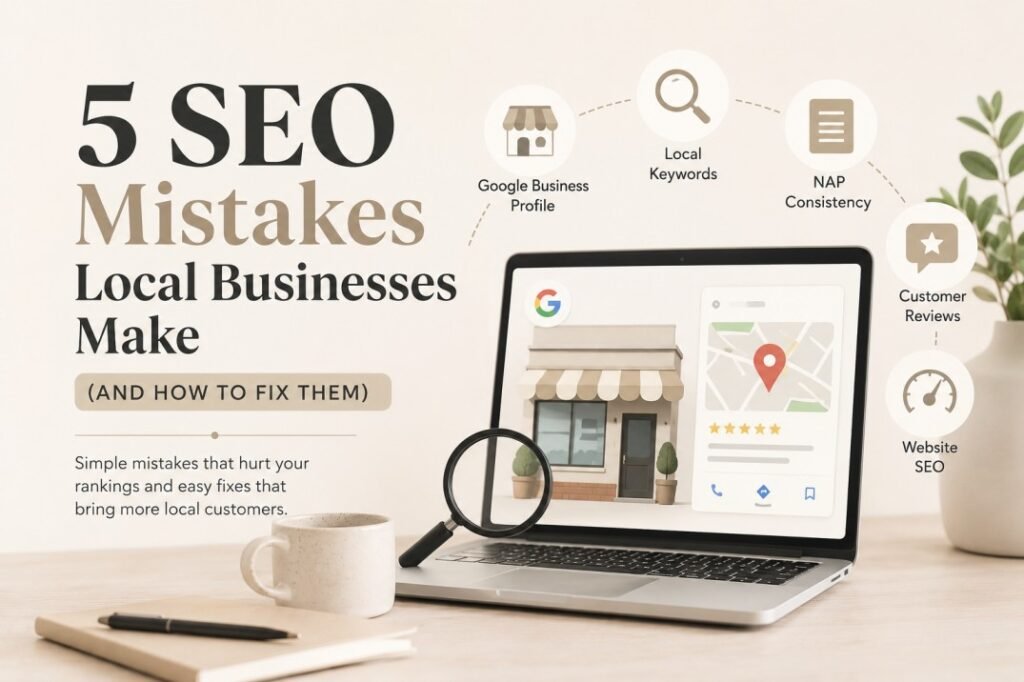
In this guide, we’ll explore the five biggest SEO mistakes local businesses make, explain why they hurt your rankings, and show you exactly how to fix them with practical, beginner-friendly steps. You’ll also learn actionable local SEO tips, discover how to optimize your Google Business Profile, improve your Google Maps SEO, and build a stronger online presence that attracts more local customers.
By the end of this article, you’ll have a clear roadmap for improving your local search rankings, increasing website traffic, and turning more nearby searches into real business opportunities.
1. Ignoring Google Business Profile Optimization
Your Google Business Profile (GBP)—formerly known as Google My Business—is one of the most influential factors in local SEO. It helps Google understand your business and displays essential information such as your location, business hours, reviews, photos, services, and contact details directly in Google Search and Google Maps.
Despite its importance, many local businesses either neglect their profile after creating it or never claim it in the first place. An incomplete or outdated profile can make your business appear less trustworthy to both Google and potential customers, reducing your visibility in local search results.
Why Do Businesses Ignore Their Google Business Profile?
Many business owners assume that simply creating a profile is enough. Others are too busy managing day-to-day operations and forget to update it regularly. Some aren’t aware of features like Google Posts, FAQs, service listings, or business attributes that can significantly improve customer engagement.
Without regular updates, your profile becomes stale, and Google may prioritize competitors who actively maintain theirs.
How This Mistake Hurts Your Local Rankings
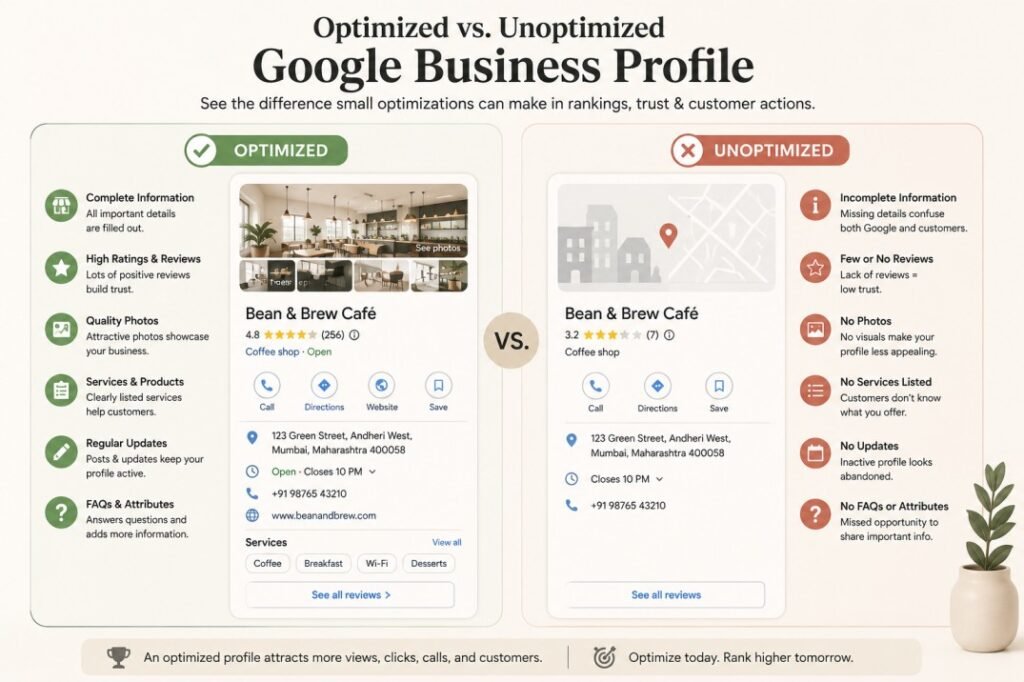
An unoptimized Google Business Profile can negatively impact your business in several ways:
- Lower visibility in Google Maps.
- Reduced chances of appearing in the Local Pack (the top three map listings).
- Less trust from potential customers.
- Fewer phone calls, direction requests, and website visits.
- Missed opportunities to rank for “near me” searches.
Google rewards businesses that provide complete, accurate, and up-to-date information because it improves the user experience.
Real-World Example
Imagine two nearby dental clinics.
Clinic A
- Verified Google Business Profile
- 150 customer reviews
- Updated business hours
- High-quality clinic photos
- Frequently publishes Google Posts
- Lists all treatments and services
- Answers customer questions
Clinic B
- Only has a business name and phone number
- No photos
- Few reviews
- Outdated holiday hours
- No service descriptions
Even if both clinics offer excellent care, Google is more likely to recommend Clinic A because it provides richer, more reliable information for users.
How to Optimize Your Google Business Profile (Step-by-Step)
Step 1: Verify Your Business
Claim and verify your Google Business Profile to gain full control over your business listing.
Verification confirms that your business is legitimate and allows you to update information, respond to reviews, publish posts, and access valuable performance insights.
Step 2: Choose the Right Business Categories
Selecting accurate categories helps Google understand what your business offers.
For example:
Primary Category:
- Digital Marketing Agency
Secondary Categories:
- Internet Marketing Service
- Marketing Consultant
- Advertising Agency
Choose the category that best represents your primary service and then add relevant secondary categories without overdoing it.
Step 3: Complete Every Information Field
Fill out every available section, including:
- Business Name
- Address
- Phone Number
- Website
- Business Hours
- Holiday Hours
- Services
- Products
- Business Description
- Opening Date
- Service Areas
- Appointment Links
The more complete your profile, the more confidence Google has in your business.
Step 4: Upload High-Quality Photos
Businesses with fresh, high-quality images often receive more engagement than those with few or outdated visuals.
Consider uploading:
- Exterior photos
- Interior photos
- Team photos
- Product images
- Before-and-after examples
- Office workspace
- Customer interactions (with permission)
Update photos regularly to keep your profile active.
Step 5: Add Every Service You Offer
Many businesses only mention their primary service.
Instead, create individual service listings.
Example for a digital marketing agency:
- Local SEO
- Technical SEO
- Google Ads
- Social Media Marketing
- Website Development
- Content Marketing
- SEO Audits
This increases your chances of appearing for more specific searches.
Step 6: Encourage Customer Reviews
Customer reviews influence both rankings and buying decisions.
Ask satisfied customers to leave honest reviews after completing a project or service.
When responding:
- Thank customers for positive reviews.
- Address negative feedback professionally.
- Avoid generic replies.
- Include relevant keywords naturally when appropriate.
Step 7: Publish Google Posts Regularly
Google Posts help keep your profile active.
Share updates like:
- Special offers
- Blog articles
- Company news
- Events
- New services
- Seasonal promotions
Posting consistently signals that your business is active and engaged.
Step 8: Use FAQs and Business Attributes
Many businesses overlook these features.
Examples of useful attributes:
- Wheelchair Accessible
- Women-Owned
- Free Wi-Fi
- Online Appointments
- Parking Available
Similarly, FAQs allow you to answer common customer questions before they even contact you.
Pro Tips for Better Google Business Profile SEO
✔ Add new photos every month.
✔ Update holiday hours before festivals or public holidays.
✔ Respond to every customer review.
✔ Include keywords naturally in your business description.
✔ Keep your contact details consistent across all online platforms.
✔ Monitor your Insights to understand how customers find your business.
Common Misconceptions
“Creating a Google Business Profile is enough.”
False.
Optimization and regular updates are essential for maintaining visibility and competitiveness.
“More keywords in the business name means better rankings.”
Incorrect.
Adding keywords to your business name that aren’t part of your official business name violates Google’s guidelines and can result in penalties.
“Reviews only influence customer trust.”
Not entirely.
Reviews also contribute to local search rankings by signaling relevance, prominence, and credibility to Google.
Key Takeaway
Think of your Google Business Profile as your digital storefront. Just as you wouldn’t leave a physical shop untidy or outdated, your online presence deserves the same attention. A well-optimized profile improves visibility, builds trust, and helps convert local searches into paying customers.
2. Targeting the Wrong Local Keywords
One of the biggest SEO mistakes local businesses make is trying to rank for broad, highly competitive keywords while ignoring the phrases their potential customers actually use.
For example, if you’re a bakery in Pune, trying to rank for “cakes” alone is far less effective than targeting “custom birthday cakes in Pune” or “best bakery near Koregaon Park.” These local, intent-driven searches are more likely to attract people who are ready to buy.
Choosing the wrong keywords can lead to poor rankings, low website traffic, and visitors who aren’t interested in your services.
Why Do Businesses Choose the Wrong Keywords?
Many business owners:
- Guess what customers search for instead of researching.
- Focus only on high-volume keywords.
- Ignore local search intent.
- Skip long-tail keyword opportunities.
- Don’t optimize for neighborhood or city-specific searches.
As a result, they compete against national brands instead of targeting customers in their service area.
Generic Keywords vs. Local Keywords
Here’s the difference:
| Generic Keyword | Local Keyword |
|---|---|
| Dentist | Dentist in Andheri |
| Gym | Best gym in Bandra |
| Plumber | Emergency plumber in Jaipur |
| Digital Marketing | Digital marketing agency in Mumbai |
| Photographer | Wedding photographer in Pune |
Local keywords include geographic modifiers, making them more relevant to users searching for nearby businesses.
Understanding Search Intent
Search intent refers to the reason behind a user’s query. Local businesses should prioritize transactional and local intent keywords—searches made by people ready to take action.
Examples:
- “SEO consultant near me”
- “Hair salon in Andheri West”
- “24-hour electrician in Jaipur”
- “Best café in Bandra”
These searches often indicate that the user is looking to book a service, visit a store, or make a purchase.
How to Conduct Local Keyword Research
Step 1: Brainstorm Your Core Services
List every service or product you offer. For example, a digital marketing agency might include:
- SEO Services
- Local SEO
- Google Ads
- Social Media Marketing
- Website Development
Step 2: Add Location Modifiers
Combine each service with your target location:
- SEO services in Mumbai
- Local SEO in Andheri
- Google Ads expert in Bandra
- Website designer in Powai
Don’t forget to include neighborhood names, landmarks, and nearby areas if relevant.
Step 3: Explore Long-Tail Keywords
Long-tail keywords are more specific phrases that often have lower competition and higher conversion rates.
Examples:
- Affordable SEO services for small businesses in Mumbai
- Best digital marketing consultant in Andheri
- Local SEO expert near me
- Google Business Profile optimization service
These keywords attract users with a clear intent and can drive more qualified leads.
Step 4: Analyze Competitors
Look at the keywords your top local competitors are targeting. Pay attention to:
- Page titles
- Headings
- Service pages
- Blog topics
- Meta descriptions
This can reveal keyword opportunities you may have missed.
Step 5: Use Keyword Research Tools
Helpful tools include:
- Google Keyword Planner
- Google Search suggestions
- Google Search Console
- Google Trends
- Ahrefs
- Semrush
- Ubersuggest
These tools can help you discover search volume, competition, and related keyword ideas.
Pro Tips for Smarter Local Keyword Targeting
✔ Focus on keywords with clear local intent.
✔ Create dedicated pages for each major service and location.
✔ Naturally include keywords in titles, headings, URLs, and body content.
✔ Answer local customer questions through blog posts.
✔ Optimize for “near me” searches by maintaining a complete Google Business Profile and accurate location signals.
Common Misconceptions
“Higher search volume always means better keywords.”
Not necessarily. A lower-volume local keyword often converts better because it matches what nearby customers are actually searching for.
“I only need one keyword per page.”
Modern SEO focuses on topics, not single keywords. Use related terms, synonyms, and naturally answer user questions to provide comprehensive content.
Key Takeaway
Successful local SEO starts with understanding how your customers search. By targeting location-specific, intent-driven keywords instead of broad generic terms, you can attract more qualified traffic, improve your local search rankings, and generate leads that are far more likely to convert.
3. Inconsistent NAP Information Across the Web
Your Name, Address, and Phone Number (NAP) may seem like simple business details, but they are among the strongest trust signals for local SEO.
Google compares your NAP information across hundreds of online sources to verify that your business is legitimate and reliable. If your details differ from one platform to another—even slightly—it can confuse search engines and hurt your local search rankings.
For example, imagine your website lists your business as:
XYZ Digital Marketing
But your Google Business Profile says:
XYZ Digital
Meanwhile, Facebook lists:
XYZ Digital Solutions
Even if these businesses are the same, Google may struggle to determine which information is accurate.
Why Does This Happen?
Inconsistent NAP information usually occurs because businesses:
- Move to a new location but don’t update every listing.
- Change phone numbers.
- Rebrand their business name.
- Create duplicate Google Business Profiles.
- Forget old directory listings.
- Have multiple employees creating listings independently.
These inconsistencies accumulate over time and reduce Google’s confidence in your business.
Why Inconsistent NAP Hurts Local Rankings
Google values consistency.
When your business information matches across trusted websites, Google is more confident about showing your business in local search results and Google Maps.
However, inconsistent details can result in:
- Lower Google Maps rankings.
- Reduced trust signals.
- Duplicate business listings.
- Confused customers.
- Lost phone calls.
- Incorrect driving directions.
- Lower local search visibility.
Remember, if customers can’t contact you easily, Google assumes you’re providing a poor user experience.
Real-World Example
Suppose a customer searches for:
“Digital Marketing Agency in Andheri”
Your website lists:
Phone: +91 9855555555
Google Business Profile shows:
Phone: +91 9875555555
JustDial still displays your old office address.
Facebook lists a different business name.
The customer doesn’t know which information is correct and decides to contact a competitor instead.
One small inconsistency has just cost you a potential client.
What Are Local Citations?
A local citation is any online mention of your business details.
Examples include:
- Google Business Profile
- Bing Places
- Apple Maps
- JustDial
- IndiaMART
- Sulekha
- Yelp
- Yellow Pages
- Local business directories
- Chamber of Commerce websites
The more consistent these citations are, the stronger your local SEO becomes.
How to Audit Your NAP Information
Step 1: Write Down Your Official Business Information
Decide on one standard version of your:
- Business Name
- Address
- Phone Number
- Website URL
Use this exact format everywhere.
Step 2: Search Your Business on Google
Search variations like:
- Your Business Name
- Your Phone Number
- Your Address
Check whether old listings still exist.
Step 3: Review Every Directory Listing
Verify information on:
- Google Business Profile
- JustDial
- IndiaMART
- Sulekha
- Bing Places
- Apple Maps
Update any incorrect information immediately.
Step 4: Remove Duplicate Listings
Duplicate listings confuse both customers and Google.
Request removal or merge duplicate listings wherever possible.
Step 5: Keep Future Updates Consistent
Whenever you:
- Move offices
- Change phone numbers
- Launch a new website
- Update business hours
make sure every platform is updated—not just your website.
Pro Tips
✔ Always use the same business name.
✔ Use one primary phone number.
✔ Avoid abbreviating addresses differently.
✔ Link every directory to your official website.
✔ Update citations every few months.
Common Misconceptions
“Small spelling differences don’t matter.”
Actually, they do.
Google notices even minor inconsistencies such as:
- Road vs Rd.
- Street vs St.
- Pvt Ltd vs Private Limited
Although these differences alone may not drastically hurt rankings, maintaining complete consistency is always best practice.
“Only Google Business Profile matters.”
Not true.
Google cross-checks your information from multiple trusted sources to verify business legitimacy.
Key Takeaway
Think of NAP consistency as your business’s digital identity card. The more consistent your information is across the web, the more Google trusts your business—and trust leads to better local rankings.
4. Ignoring Website SEO
Many business owners believe that having a Google Business Profile is enough to rank locally.
While a well-optimized profile is essential, your website remains one of Google’s most important ranking signals.
A slow, outdated, or poorly optimized website creates a poor user experience, causing visitors to leave quickly. Google notices this behavior and may rank competitors with faster, more user-friendly websites above yours.
In other words, even the best Google Business Profile can’t fully compensate for a weak website.
Common Website SEO Problems
Local businesses often struggle with:
- Slow website speed
- Poor mobile responsiveness
- Missing title tags
- Missing meta descriptions
- Thin service pages
- Broken links
- Poor navigation
- Missing internal links
- Large image files
- No schema markup
- Poor Core Web Vitals
These issues reduce both user satisfaction and search visibility.
Why Website SEO Matters
Google wants to recommend websites that provide the best experience.
A technically optimized website helps Google:
- Crawl your pages efficiently.
- Understand your content.
- Index pages correctly.
- Improve rankings.
- Deliver a better experience to users.
A well-optimized website also increases conversions because visitors can easily find the information they’re looking for.
Real-World Example
Imagine searching for:
“Best bakery in Jaipur”
You click a website.
The page takes eight seconds to load.
Buttons overlap on your mobile phone.
Images are blurry.
The menu doesn’t work.
You leave immediately.
Google sees users abandoning the website and gradually reduces its rankings.
How to Improve Your Website SEO
Step 1: Improve Website Speed
Fast websites provide a better user experience and rank higher.
Ways to improve speed:
- Compress images.
- Use next-generation formats like WebP.
- Enable browser caching.
- Minify CSS and JavaScript.
- Remove unnecessary plugins.
- Choose reliable hosting.
Aim for a loading time of under three seconds.
Step 2: Make Your Website Mobile-Friendly
More than half of local searches happen on smartphones.
Ensure that:
- Text is readable.
- Buttons are easy to tap.
- Menus work properly.
- Images scale correctly.
- Forms are easy to complete.
Always test your website on multiple screen sizes.
Step 3: Optimize Every Page Title
Instead of:
Services
Use:
Local SEO Services in Mumbai | Rakhee Pareek Digital Marketing
Descriptive titles help Google understand your page while improving click-through rates.
Step 4: Write Better Meta Descriptions
Although meta descriptions aren’t a direct ranking factor, they encourage users to click your listing.
A compelling meta description should:
- Include your target keyword.
- Explain the page.
- Encourage action.
- Stay within recommended length.
Step 5: Strengthen Internal Linking
Connect related pages naturally.
Examples:
- Homepage → Services
- Services → Local SEO
- Local SEO → Google Business Profile Guide
- Blog → SEO Audit Guide
Internal links help Google discover pages while keeping visitors engaged longer.
Step 6: Fix Broken Links
Broken links frustrate users and waste crawl budget.
Regularly check your website for:
- 404 errors
- Missing images
- Redirect chains
- Broken navigation links
Step 7: Optimize Images
Large images slow websites significantly.
Best practices include:
- Compress images before uploading.
- Use descriptive filenames.
- Add keyword-rich alt text.
- Choose modern formats such as WebP.
- Lazy load below-the-fold images.
Step 8: Improve Core Web Vitals
Google measures:
- Loading performance
- Visual stability
- User interaction speed
Improving these metrics enhances both rankings and user experience.
Pro Tips
✔ Create dedicated pages for every service.
✔ Add schema markup.
✔ Update old blog posts.
✔ Publish useful local content regularly.
✔ Improve navigation menus.
✔ Remove duplicate pages.
✔ Use HTTPS for security.
Common Misconceptions
“A beautiful website automatically ranks.”
Design alone doesn’t improve rankings.
Google evaluates content quality, technical performance, relevance, usability, and authority.
“Homepage SEO is enough.”
Every important page should be individually optimized for its target keyword and user intent.
Key Takeaway
Your website is the foundation of your local SEO strategy. A fast, mobile-friendly, technically sound website not only improves search rankings but also turns more visitors into paying customers.
5. Not Collecting Customer Reviews
Imagine you’re searching for a restaurant, dentist, or salon in your city.
You find two businesses:
Business A
⭐ 4.9 Rating
420 Reviews
Business B
⭐ 4.6 Rating
8 Reviews
Which one would you trust?
Most people naturally choose Business A.
That’s exactly why customer reviews play such an important role in Google Business Profile SEO, Google Maps SEO, and overall local search performance.
Why Reviews Matter
Reviews influence:
- Local rankings
- Customer trust
- Click-through rates
- Conversion rates
- Brand reputation
Google considers reviews a sign that your business is active, trustworthy, and valued by customers.
Why Businesses Don’t Ask for Reviews
Many owners believe:
- Customers will leave reviews automatically.
- Asking feels awkward.
- One or two reviews are enough.
- Negative reviews will hurt the business.
In reality, satisfied customers often just need a polite reminder.
How Reviews Improve Local SEO
Positive reviews help Google understand that:
- Customers enjoy your service.
- Your business is active.
- People engage with your brand.
- You deserve greater visibility.
Fresh reviews are generally more valuable than a large number of old reviews because they indicate ongoing customer satisfaction.
Ethical Ways to Generate More Reviews
Ask at the Right Time
The best moment is immediately after successfully completing a service or sale.
Make It Easy
Send customers:
- A direct review link.
- A QR code.
- A follow-up email.
- A WhatsApp message.
The fewer steps involved, the more likely customers are to leave a review.
Train Your Team
Encourage staff members to politely request feedback from happy customers.
Consistency matters.
Respond to Every Review
Whether positive or negative:
- Thank customers.
- Address concerns professionally.
- Never argue.
- Show appreciation.
Thoughtful responses demonstrate excellent customer service to both Google and future customers.
Never Buy Fake Reviews
Purchased or fabricated reviews violate Google’s policies and can damage your credibility if detected.
Focus on earning genuine feedback through great service.
Real-World Example
A local café asks every satisfied customer to scan a QR code that opens its Google review page.
Within six months:
- Reviews grow from 35 to 180.
- Average rating increases to 4.8 stars.
- Google Maps visibility improves.
- More customers discover the café through local search.
Small, consistent efforts often produce significant long-term results.
Pro Tips
✔ Request reviews regularly.
✔ Reply within 24–48 hours whenever possible.
✔ Mention customer names in responses when appropriate.
✔ Thank reviewers genuinely.
✔ Use feedback to improve your business.
✔ Showcase positive reviews on your website.
Common Misconceptions
“Only five-star reviews matter.”
Not necessarily.
A healthy mix of honest reviews appears more authentic than a profile containing only perfect ratings.
“Negative reviews always hurt rankings.”
Not if handled professionally.
A respectful, solution-oriented response often builds more trust than ignoring the review altogether.
Key Takeaway
Customer reviews are more than testimonials—they’re a powerful local SEO signal. By consistently earning and responding to genuine feedback, you strengthen your online reputation, improve local search visibility, and give potential customers more reasons to choose your business.
Bonus — The Ultimate Local SEO Checklist
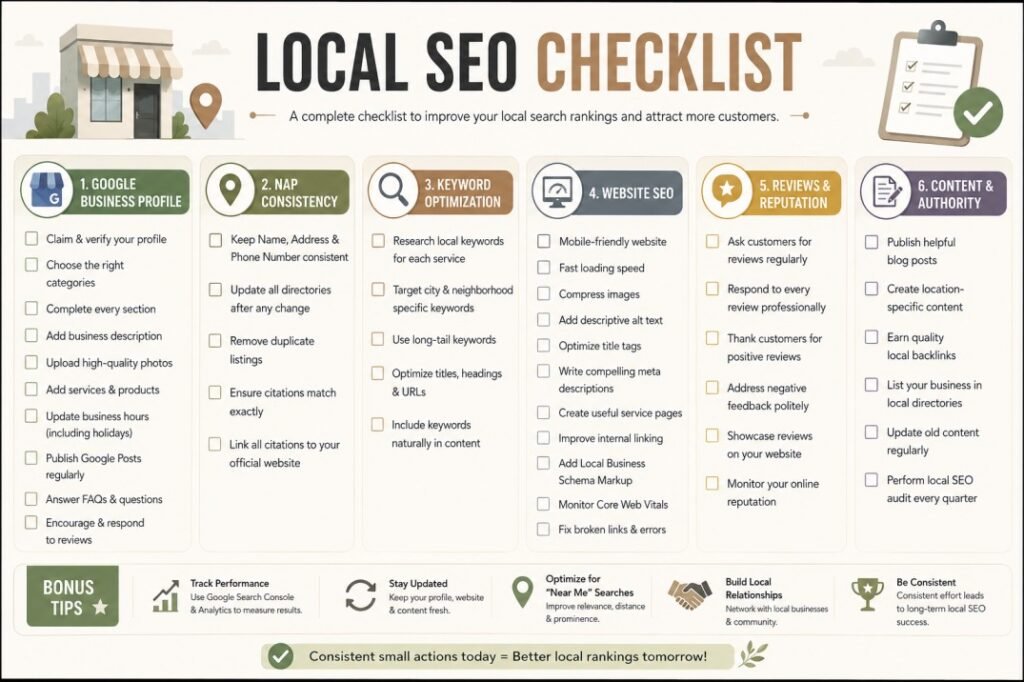
Use this practical local SEO checklist to audit your business and identify areas for improvement. Save it, print it, or revisit it regularly as part of your ongoing SEO strategy.
Local SEO Checklist
Google Business Profile
☐ Claim and verify your Google Business Profile
☐ Select the most relevant primary and secondary categories
☐ Complete every profile section
☐ Add your business description
☐ Upload high-quality photos regularly
☐ List all products and services
☐ Update business hours, including holidays
☐ Publish Google Posts regularly
☐ Answer customer questions in the Q&A section
☐ Enable appointment or booking links (if applicable)
NAP Consistency
☐ Keep your Name, Address, and Phone Number consistent everywhere
☐ Update all online directories after any business changes
☐ Remove duplicate business listings
☐ Link all citations back to your official website
Keyword Optimization
☐ Research local keywords for every service
☐ Target city and neighborhood-specific searches
☐ Use long-tail keywords naturally
☐ Optimize page titles and headings
☐ Include keywords in URLs where relevant
Website SEO
☐ Ensure your website is mobile-friendly
☐ Improve website speed
☐ Compress images
☐ Add descriptive alt text
☐ Fix broken links
☐ Create useful service pages
☐ Optimize title tags and meta descriptions
☐ Improve internal linking
☐ Add Local Business Schema Markup
☐ Monitor Core Web Vitals
Reviews & Reputation
☐ Ask customers for reviews regularly
☐ Respond to every review professionally
☐ Showcase reviews on your website
☐ Monitor your online reputation
Content & Authority
☐ Publish helpful blog posts
☐ Create location-specific content
☐ Earn quality local backlinks
☐ Update older content regularly
☐ Perform a local SEO audit every quarter
Pro Tip: Don’t try to complete everything in one day. Focus on one section each week and you’ll build a strong local SEO foundation over time.
10 Expert Local SEO Tips Most Beginners Overlook
While fixing common SEO mistakes is essential, these advanced tips can give your business a competitive edge.
1. Optimize for “Near Me” Searches
Google uses your location, business relevance, and proximity to determine which businesses appear for “near me” searches. Keep your Google Business Profile updated and ensure your location information is accurate.
2. Add Local Business Schema Markup
Schema markup helps search engines better understand your business details, including your address, phone number, business hours, and services. It can also improve your chances of earning rich search results.
3. Create Dedicated Location Pages
If you serve multiple cities or neighborhoods, create a unique page for each location with original content. Avoid copying the same text across different pages.
4. Build High-Quality Local Backlinks
Partner with local organizations, business associations, schools, charities, and community websites to earn relevant backlinks that strengthen your local authority.
5. Regularly Update Your Google Business Profile
Fresh photos, posts, offers, events, and business updates show Google that your business is active and engaged.
6. Monitor Your Competitors
Analyze businesses that consistently rank above you. Study their website structure, reviews, content, backlinks, and Google Business Profile to identify improvement opportunities.
7. Create Helpful Local Content
Instead of only writing about your services, publish articles that answer local customer questions.
Examples include:
- Best cafés in Mumbai for remote work
- Home maintenance tips for monsoon season
- Local SEO trends for small businesses in India
Helpful content builds trust and attracts long-term organic traffic.
8. Improve User Experience
Google increasingly rewards websites that are easy to use.
Focus on:
- Clear navigation
- Fast loading speed
- Readable fonts
- Mobile usability
- Accessible design
- Strong calls-to-action
A better user experience often leads to better rankings and higher conversions.
9. Track Your SEO Performance
Use tools like Google Search Console and Google Analytics to monitor:
- Organic traffic
- Click-through rate (CTR)
- Keyword rankings
- Page performance
- Technical issues
Review your data monthly and adjust your strategy based on real insights.
10. Make Local SEO an Ongoing Process
Local SEO isn’t a one-time task.
Google’s algorithms, competitors, and customer behavior constantly evolve. Regular updates, audits, and optimization are essential for maintaining and improving your rankings.
Frequently Asked Questions (FAQ)
1. What is Local SEO?
Local SEO is the process of optimizing your online presence so your business appears in local search results on Google and Google Maps. It focuses on improving visibility for searches with local intent, such as “plumber near me” or “dentist in Mumbai.” Local SEO combines Google Business Profile optimization, website SEO, local citations, reviews, and relevant content to help nearby customers find your business.
2. How Long Does Local SEO Take to Show Results?
Most businesses begin noticing improvements within 3 to 6 months, although timelines vary depending on competition, website quality, and your current SEO status. Businesses in highly competitive industries may take longer. Consistent optimization, quality content, and regular profile updates usually produce better long-term results.
3. Does Google Business Profile Improve Rankings?
Yes. A well-optimized Google Business Profile is one of the most important local ranking factors. Completing every section, selecting the right categories, adding photos, publishing posts, collecting reviews, and keeping information accurate can significantly improve your visibility in Google Search and Google Maps.
4. How Many Google Reviews Should My Business Have?
There isn’t a magic number. Instead of focusing on quantity alone, aim for a steady flow of genuine, recent reviews. Businesses with consistent, authentic feedback and thoughtful responses often perform better than those with many outdated reviews.
5. What Are Local Citations?
Local citations are online mentions of your business’s Name, Address, and Phone Number (NAP). Examples include Google Business Profile, Justdial, Bing Places, Apple Maps, Facebook, and industry-specific directories. Consistent citations help search engines verify your business information and improve trust.
6. Can I Rank Locally Without a Website?
While a Google Business Profile can help you appear in Google Maps, having a website greatly improves your chances of ranking in local search results. A website allows you to target more keywords, showcase your services, publish helpful content, and build authority that supports long-term SEO growth.
7. How Often Should I Update My Google Business Profile?
Update your profile whenever business information changes. Even if nothing changes, try to upload new photos, publish Google Posts, respond to reviews, and check your profile at least once a month. Regular activity signals that your business is active and trustworthy.
8. Is Local SEO Different From Traditional SEO?
Yes. Traditional SEO focuses on improving rankings nationally or globally, while local SEO targets customers within a specific geographic area. Local SEO places greater emphasis on Google Business Profile optimization, local citations, reviews, NAP consistency, and location-specific keywords.
9. Why Is Website Speed Important for Local SEO?
Website speed affects both user experience and search rankings. Slow websites often lead to higher bounce rates, fewer conversions, and lower visibility in search results. Optimizing images, using quality hosting, and improving Core Web Vitals can make your website faster and more user-friendly.
10. How Often Should I Perform a Local SEO Audit?
A comprehensive local SEO audit should be performed every 3 to 6 months. Regular audits help identify technical issues, outdated information, broken links, missing content, and new optimization opportunities before they impact your rankings.
Also read : How to do an SEO Audit step by step.
Conclusion
Local SEO isn’t about finding shortcuts or chasing algorithm updates—it’s about creating a trustworthy, user-friendly online presence that helps both search engines and customers understand your business.
Throughout this guide, we’ve explored the five biggest SEO mistakes local businesses make:
- Ignoring Google Business Profile optimization
- Targeting the wrong local keywords
- Maintaining inconsistent NAP information
- Neglecting website SEO
- Failing to collect and manage customer reviews
The good news is that every one of these mistakes can be fixed.
Start by optimizing your Google Business Profile, researching the right local keywords, ensuring your business information is consistent across the web, improving your website’s performance, and encouraging satisfied customers to leave genuine reviews. Small, consistent improvements often lead to significant long-term gains in local search visibility.
Remember, local SEO is not a one-time project. Google’s algorithms evolve, competitors continue optimizing their websites, and customer expectations change over time. Businesses that regularly monitor their performance, update their content, and adapt to best practices are the ones that stay ahead.
If you’re serious about improving your local search rankings, attracting more nearby customers, and growing your business online, now is the perfect time to take action.
Need Help Improving Your Local SEO?
Whether you need a complete SEO audit, Google Business Profile optimization, technical SEO improvements, or a customized local SEO strategy, professional guidance can help you achieve faster and more sustainable results.
Get in touch today for a comprehensive local SEO consultation and start turning more local searches into loyal customers.