

SEO is constantly evolving, and in 2026, simply publishing content is no longer enough to rank on Google. Search engines now evaluate websites based on technical performance, user experience, content quality, search intent, and trustworthiness. If your website isn’t performing well, an SEO audit is the first step to understanding what’s holding it back.
Whether you own a business website, blog, eCommerce store, or portfolio, conducting a regular Website SEO Audit helps identify issues that prevent your pages from ranking higher in search results. From fixing broken links and improving page speed to optimizing content and ensuring proper indexing, an SEO audit gives you a clear roadmap for improving your website’s visibility.
Many beginners make the mistake of focusing only on keywords while ignoring technical SEO, user experience, and website health. Even the best content may struggle to rank if search engines cannot crawl or understand your website properly.
In this comprehensive SEO Guide for Beginners, you’ll learn exactly how to do an SEO audit step by step using both free and paid tools. By following this guide, you’ll be able to improve your website’s performance, increase organic traffic, and build a strong SEO strategy for long-term success.
Quick Summary
By the end of this guide, you’ll know how to:
- Check website indexing
- Find crawl errors
- Audit technical SEO
- Improve on-page SEO
- Analyze content quality
- Evaluate backlinks
- Improve user experience
- Create a professional SEO audit report
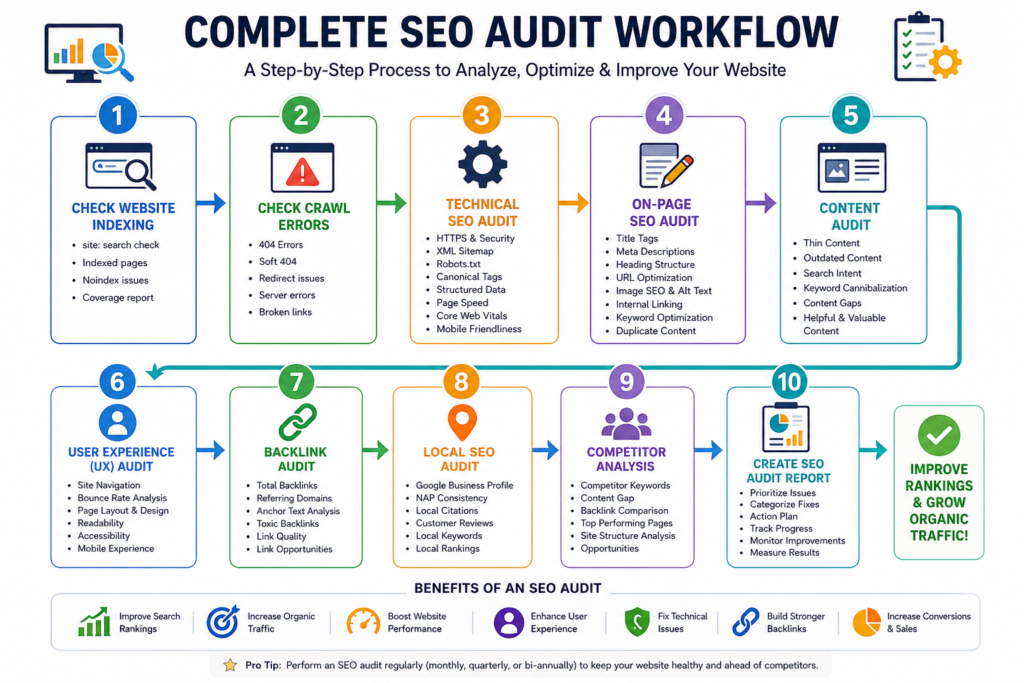
What is an SEO Audit?
An SEO Audit is a detailed evaluation of your website to identify issues that affect its visibility in search engines like Google and Bing. Think of it as a complete health checkup for your website.
An SEO audit examines every important aspect of your website, including:
- Technical SEO
- On-page SEO
- Off-page SEO
- Website performance
- Content quality
- User experience
- Mobile usability
- Backlink profile
- Website security
- Indexing and crawlability
The goal is to discover problems that prevent your website from ranking well and provide actionable recommendations to fix them.
Why Does an SEO Audit Matter?
Search engines continuously update their algorithms. What worked a few years ago may no longer be effective today.
For example:
Imagine you publish an excellent blog post, but Google doesn’t index it because your robots.txt file accidentally blocks search engine crawlers. Your content may never appear in search results, regardless of its quality.
An SEO audit helps identify such hidden issues before they negatively impact your rankings.
How SEO Audits Impact Rankings
A proper SEO audit can help you:
- Improve search engine visibility
- Increase organic traffic
- Enhance website speed
- Fix technical errors
- Improve user experience
- Strengthen website authority
- Increase conversions
- Reduce bounce rates
- Improve Core Web Vitals
- Support long-term SEO growth
While an SEO audit doesn’t directly boost rankings overnight, implementing its recommendations creates a stronger foundation for sustainable improvements.
How Often Should You Perform an SEO Audit?
The ideal frequency depends on the size and activity of your website.
| Website Type | Recommended Audit Frequency |
|---|---|
| Personal Blog | Every 6 months |
| Small Business Website | Every 3–4 months |
| Corporate Website | Every quarter |
| eCommerce Store | Monthly |
| News Website | Weekly or Monthly |
| Large Enterprise Website | Continuous monitoring |
Pro Tip: Conduct a full SEO audit whenever you redesign your website, migrate domains, or experience a sudden drop in organic traffic.
Why SEO Audits Are Important in 2026
SEO has become more sophisticated than ever. Google now uses advanced AI systems to understand content, evaluate user satisfaction, and determine whether a page genuinely deserves to rank.
Let’s explore the key reasons why SEO audits are essential in 2026.
AI-Powered Search is Changing SEO
Search engines now leverage artificial intelligence to better understand user intent and content relevance.
Platforms like:
- Google AI Overviews
- ChatGPT Search
- Perplexity AI
- Bing Copilot
- Gemini
are transforming how users discover information.
These AI systems prioritize content that is:
- Accurate
- Well-structured
- Comprehensive
- Easy to understand
- Trustworthy
An SEO audit ensures your website meets these evolving standards.
EEAT Matters More Than Ever
Google emphasizes Experience, Expertise, Authoritativeness, and Trustworthiness (EEAT) when evaluating content quality.
During your audit, assess whether your website includes:
- Author bios with credentials
- About Us page
- Contact information
- Privacy Policy
- Clear sources and references
- Original insights
- Real-world examples
- Updated content
These elements build trust with both users and search engines.
Expert Tip: If you’re writing about specialized topics like health or finance, showcasing real expertise is especially important.
Core Web Vitals Influence User Experience
Google’s Core Web Vitals measure real-world user experience.
The three primary metrics are:
| Metric | What It Measures | Ideal Target |
|---|---|---|
| Largest Contentful Paint (LCP) | Loading performance | Under 2.5 seconds |
| Interaction to Next Paint (INP) | Responsiveness | Under 200 ms |
| Cumulative Layout Shift (CLS) | Visual stability | Under 0.1 |
Improving these metrics can lead to a better user experience and support your SEO efforts.
Helpful Content Wins
Google rewards content created for people—not just search engines.
During your SEO audit, ask:
- Does this content answer the user’s question?
- Is it comprehensive?
- Is it up to date?
- Does it offer unique insights?
- Is it easy to read?
- Does it solve a real problem?
If the answer is “no,” it’s time to improve or update the content.
Search Intent is More Important Than Keywords Alone
In the past, ranking often meant repeating a keyword multiple times.
Today, search engines evaluate whether your content matches the user’s intent.
Common search intents include:
- Informational: “What is SEO?”
- Navigational: “Google Search Console login”
- Transactional: “Buy SEO audit software”
- Commercial Investigation: “Best SEO tools in 2026”
During an SEO audit, ensure each page aligns with the appropriate search intent.
Mobile-First Indexing is Standard
Most users now browse the web on mobile devices, and Google primarily uses the mobile version of your website for indexing and ranking.
Check whether your website:
- Is mobile responsive
- Loads quickly on smartphones
- Uses readable font sizes
- Has touch-friendly buttons
- Avoids horizontal scrolling
A poor mobile experience can negatively impact both user engagement and search visibility.
User Experience (UX) Affects SEO
Search engines consider how users interact with your website.
Positive user signals include:
- Longer time on page
- Lower bounce rate
- Easy navigation
- Fast loading times
- Clear content structure
A seamless user experience not only benefits SEO but also encourages visitors to stay longer and convert.
Things You Need Before Starting an SEO Audit
Conducting an SEO audit becomes much easier with the right tools. While some are free, others offer advanced features for deeper analysis.
Below are the most widely used tools by SEO professionals.
Google Search Console
Best for: Monitoring your website’s presence in Google Search.
Google Search Console provides valuable insights into:
- Indexed pages
- Search performance
- Crawl errors
- Coverage issues
- Core Web Vitals
- XML sitemap submissions
- Manual actions
- Mobile usability
If you’re serious about SEO, setting up Google Search Console is essential.
Beginner Tip: Verify your website ownership and submit your XML sitemap before starting your audit.
Google Analytics 4 (GA4)
Best for: Understanding user behavior and website performance.
GA4 helps you analyze:
- Organic traffic
- User engagement
- Top-performing pages
- Bounce rate (via engagement metrics)
- Traffic sources
- Conversion tracking
- User journeys
These insights reveal how visitors interact with your website after they arrive.
Google PageSpeed Insights
Best for: Measuring website speed and Core Web Vitals.
It evaluates:
- Mobile performance
- Desktop performance
- Loading speed
- Render-blocking resources
- Image optimization
- JavaScript efficiency
- CSS optimization
It also provides actionable recommendations to improve performance.
Google Lighthouse
Best for: Comprehensive website quality audits.
Lighthouse analyzes:
- Performance
- Accessibility
- SEO
- Best Practices
- Progressive Web App (PWA) capabilities
You can run Lighthouse directly within Chrome DevTools.
Screaming Frog SEO Spider
Best for: Crawling websites like a search engine.
It helps identify:
- Broken links
- Redirect chains
- Duplicate titles
- Missing meta descriptions
- Missing alt text
- Canonical issues
- Large images
- Orphan pages
The free version allows crawling up to 500 URLs, making it suitable for many small websites.
Ahrefs
Best for: Backlink analysis and competitor research.
Key features include:
- Backlink audits
- Keyword rankings
- Referring domains
- Competitor analysis
- Content gap analysis
- Site Explorer
- Rank tracking
It’s a powerful tool for understanding your website’s authority and identifying growth opportunities.
Semrush
Best for: All-in-one SEO and digital marketing analysis.
Semrush offers:
- Site audits
- Keyword research
- Competitor analysis
- Position tracking
- Backlink monitoring
- Content optimization
- Local SEO tools
Its comprehensive dashboard makes it a favorite among SEO professionals.
Bing Webmaster Tools
Best for: Monitoring performance on Bing Search.
It includes:
- Site scanning
- Keyword performance
- Crawl reports
- SEO recommendations
- Indexing insights
While Google dominates search, optimizing for Bing can still bring valuable traffic.
GTmetrix
Best for: Advanced website speed analysis.
GTmetrix provides detailed reports on:
- Page load time
- Largest Contentful Paint (LCP)
- Total Blocking Time (TBT)
- Cumulative Layout Shift (CLS)
- Waterfall charts
- Performance recommendations
Use it alongside PageSpeed Insights for a more complete view of your site’s speed.
Complete SEO Audit Checklist
Before diving into each step, here’s a high-level overview of the areas you’ll evaluate during your SEO audit.
| Audit Area | What to Check | Priority |
|---|---|---|
| Website Indexing | Indexed pages, noindex tags, coverage | High |
| Crawlability | Crawl errors, broken links, redirects | High |
| Technical SEO | HTTPS, XML sitemap, robots.txt, canonical tags | High |
| On-Page SEO | Titles, meta descriptions, headings, URLs | High |
| Content Quality | Thin content, duplicate content, search intent | High |
| User Experience | Navigation, mobile usability, readability | Medium |
| Core Web Vitals | LCP, INP, CLS | High |
| Backlinks | Toxic links, referring domains, anchor text | Medium |
| Local SEO | Google Business Profile, citations, reviews | Medium |
| Competitor Analysis | Keywords, backlinks, content gaps | Medium |
| Reporting | Prioritize issues and track fixes | High |
Expert Tip: Don’t try to fix everything at once. Start with high-priority technical issues that affect crawling and indexing, then move on to content, user experience, and off-page optimization.
Quick Tip: Before making any changes to your website, create a backup or note down the current state of your SEO metrics (organic traffic, indexed pages, keyword rankings, and Core Web Vitals). This makes it easier to measure improvements after implementing your SEO audit recommendations.
Step 1: Check Website Indexing
Website indexing is the foundation of SEO. If Google hasn’t indexed your pages, they simply won’t appear in search results—regardless of how well-written or optimized they are.
Think of indexing as adding your website to Google’s library. If a page isn’t in the library, no one can find it through Google Search.
Why Indexing Matters
Proper indexing helps search engines:
- Discover your pages
- Understand your content
- Rank relevant pages
- Display rich search results
- Improve organic visibility
Poor indexing often leads to:
- Low organic traffic
- Missing pages in Google
- Wasted crawl budget
- Ranking issues
1. Check Indexed Pages Using Google Search
The quickest way to see what Google has indexed is by using the site: search operator.
Example:
site:yourwebsite.comGoogle will display all indexed pages from your domain.
What to Look For
✅ Important pages appear
❌ Missing service pages
❌ Missing blog articles
❌ Duplicate URLs
❌ Staging website pages
Example
Suppose your website contains:
- Home
- About
- Services
- Contact
- 25 Blog Posts
Google only shows 14 pages.
This indicates that some pages are not indexed and require further investigation.
2. Check Google Search Console Coverage Report
Google Search Console provides a detailed indexing report.
Navigate to:
Indexing → Pages
You’ll typically see categories such as:
| Status | Meaning |
|---|---|
| Indexed | Successfully indexed |
| Crawled – Currently Not Indexed | Google found it but chose not to index |
| Discovered – Currently Not Indexed | Google knows about it but hasn’t crawled it |
| Excluded by Noindex | Blocked intentionally |
| Duplicate Without User-Selected Canonical | Duplicate version detected |
| Page with Redirect | Redirected page |
Priority Issues to Fix
High Priority
- Important pages excluded
- Large number of non-indexed pages
- Duplicate URLs
- Incorrect canonical tags
Medium Priority
- Redirected pages
- Alternate pages
Low Priority
- Archived pages
- Intentionally excluded pages
3. Check for Noindex Tags
A noindex tag tells search engines:
“Do not include this page in search results.”
Sometimes developers accidentally leave noindex enabled after launching a website.
Example:
<meta name="robots" content="noindex">Only pages like:
- Thank You pages
- Admin pages
- Login pages
should normally contain noindex tags.
4. Verify XML Sitemap
An XML sitemap helps search engines discover important pages.
Example:
https://yourwebsite.com/sitemap.xmlYour sitemap should include:
- Important pages
- Blog posts
- Categories
- Updated URLs
It should not include:
- Broken pages
- Redirected URLs
- Noindex pages
- Duplicate pages
Submit the sitemap in Google Search Console under:
Indexing → Sitemaps
5. Inspect Individual URLs
Google Search Console’s URL Inspection Tool allows you to check whether a specific page is indexed.
It shows:
- Last crawl date
- Indexing status
- Mobile usability
- Canonical URL
- Structured data
- Crawl issues
If a page isn’t indexed, click Request Indexing after resolving any issues.
Beginner Tip
If you recently published a blog, don’t expect it to rank immediately. Google may take anywhere from a few hours to several days—or longer—to crawl and index new content.
SEO Audit Checklist – Website Indexing
✔ Check site: search
✔ Review Coverage Report
✔ Remove unnecessary noindex tags
✔ Submit XML Sitemap
✔ Inspect important URLs
✔ Fix duplicate pages
✔ Request indexing for new content
Step 2: Check Crawl Errors
Once your pages are indexed, the next step is ensuring search engine bots can crawl your website without encountering errors.
Crawl errors prevent Google from accessing your content, which can negatively impact rankings and user experience.
What Are Crawl Errors?
Crawl errors occur when search engine bots cannot access a webpage.
Common reasons include:
- Deleted pages
- Broken links
- Server issues
- Redirect loops
- Incorrect URLs
- Blocked resources
Types of Crawl Errors
404 Errors
A 404 Not Found error occurs when a page no longer exists.
Example:
example.com/blog/seo-2023returns
404 Not FoundWhy It’s Bad
- Poor user experience
- Lost backlinks
- Wasted crawl budget
Fix
- Redirect the old page (301)
- Restore the page
- Update internal links
Soft 404 Errors
A Soft 404 occurs when the server returns a 200 OK status but the page contains little or no useful content.
Google interprets it as a missing page.
Examples include:
- Empty category pages
- Product pages with no content
- Blank pages
Fix by:
- Adding useful content
- Redirecting the page
- Returning a proper 404 if the page should not exist
Redirect Chains
Example:
Page A
↓
Page B
↓
Page C
↓
Final Page
Too many redirects slow down crawling and page loading.
Best practice:
Page A
↓
Final Page
Use a single 301 redirect whenever possible.
Redirect Loops
Example:
A → B
↓
B → A
Google gets trapped in an endless loop and cannot access the content.
Fix by correcting your redirect rules.
5xx Server Errors
Examples:
- 500 Internal Server Error
- 502 Bad Gateway
- 503 Service Unavailable
- 504 Gateway Timeout
These indicate server-side problems and should be addressed promptly.
Broken Internal Links
Broken internal links confuse both users and search engines.
Use tools like:
- Screaming Frog
- Ahrefs
- Semrush
to identify broken links and update or remove them.
Where to Find Crawl Errors
Google Search Console
Settings → Crawl Stats
or
Indexing → Pages
Screaming Frog also provides a comprehensive crawl report highlighting:
- 404 pages
- Redirect chains
- Broken images
- Missing pages
- Canonical errors
SEO Audit Checklist – Crawl Errors
✔ Fix 404 pages
✔ Remove redirect chains
✔ Resolve redirect loops
✔ Repair broken internal links
✔ Monitor server errors
✔ Update outdated URLs
Step 3: Audit Technical SEO
Technical SEO ensures that search engines can efficiently crawl, index, and understand your website. Even the best content may struggle to rank if technical issues exist.
1. HTTPS Security
Your website should use HTTPS instead of HTTP.
Example:
HTTPS encrypts data, builds user trust, and is a confirmed ranking signal.
Check for:
- Mixed content issues
- Expired SSL certificates
- Non-secure resources
2. XML Sitemap
A healthy sitemap should:
- Include indexable pages
- Exclude redirects
- Exclude noindex pages
- Update automatically
Large websites may use multiple sitemaps.
3. Robots.txt
The robots.txt file controls which areas of your website search engines can crawl.
Example:
User-agent: *
Disallow: /admin/

Sitemap: https://example.com/sitemap.xml
Avoid accidentally blocking important pages.
4. Canonical Tags
Canonical tags tell Google which version of a page is the preferred one.
Example:
<link rel="canonical" href="https://example.com/seo-audit-guide/">This helps prevent duplicate content issues.
5. Structured Data (Schema Markup)
Structured data provides additional context about your content, making it easier for search engines to understand.
Common schema types include:
- Article
- FAQ
- Organization
- Local Business
- Product
- Breadcrumb
- Review
Benefits:
- Rich snippets
- Better visibility
- Higher click-through rates
Use Google’s Rich Results Test to validate your schema.
6. Page Speed
Fast websites offer a better user experience and are favored by search engines.
Common improvements:
- Compress images
- Minify CSS and JavaScript
- Enable browser caching
- Use a Content Delivery Network (CDN)
- Reduce server response time
- Implement lazy loading
Aim for:
- Load time under 3 seconds
- High performance scores on PageSpeed Insights
7. Mobile Friendliness
Most users browse on mobile devices.
Check:
- Responsive design
- Readable fonts
- Proper button spacing
- Mobile navigation
- No horizontal scrolling
Use Google’s Mobile-Friendly testing tools or Lighthouse reports.
8. Core Web Vitals
Google measures page experience using three Core Web Vitals:
| Metric | Good Score | Why It Matters |
|---|---|---|
| Largest Contentful Paint (LCP) | Under 2.5 seconds | Fast loading |
| Interaction to Next Paint (INP) | Under 200 ms | Responsive interactions |
| Cumulative Layout Shift (CLS) | Under 0.1 | Stable layout |
Review these metrics in Google Search Console and PageSpeed Insights.
Technical SEO Audit Checklist
✔ HTTPS enabled
✔ SSL certificate valid
✔ XML sitemap submitted
✔ Robots.txt configured correctly
✔ Canonical tags implemented
✔ Structured data validated
✔ Fast page speed
✔ Mobile-friendly design
✔ Core Web Vitals optimized
Step 4: Audit On-Page SEO
On-page SEO focuses on optimizing individual pages so search engines can understand them and users can easily consume their content.
1. Title Tags
Your title tag is often the first thing users see in search results.
Best practices:
- Include the primary keyword
- Keep it between 50–60 characters
- Make it compelling and descriptive
- Avoid keyword stuffing
Example:
❌ Home
✅ How to Do an SEO Audit Step by Step (2026 Guide)
2. Meta Descriptions
A strong meta description encourages clicks.
Best practices:
- 150–160 characters
- Include the target keyword naturally
- Highlight the page’s value
- Add a clear call to action
Example:
“Learn how to perform a complete SEO audit step by step with this beginner-friendly guide. Improve rankings, fix issues, and boost organic traffic.”
3. Heading Structure
Use headings logically:
- H1 (only one per page)
- H2 for main sections
- H3 for subsections
- H4 only when necessary
This improves readability and helps search engines understand content hierarchy.
4. URL Optimization
Good URL:
example.com/seo-audit-guidePoor URL:
example.com/page?id=987654Best practices:
- Short
- Descriptive
- Keyword-rich
- Hyphen-separated
- Avoid unnecessary parameters
5. Image SEO
Optimize every image by:
- Compressing file sizes
- Using descriptive filenames
- Choosing modern formats (WebP where appropriate)
- Adding meaningful alt text
- Specifying image dimensions to reduce layout shifts
Example:
Filename:
seo-audit-checklist.webpAlt Text:
Complete SEO audit checklist for beginners6. Internal Linking
Internal links help users navigate your website and distribute authority across pages.
Examples:
- Link from your SEO audit guide to your keyword research guide.
- Link related blog posts to one another.
- Use descriptive anchor text rather than generic phrases like “click here.”
7. Keyword Placement
Include your primary keyword naturally in:
- H1
- First 100 words
- H2 headings (where relevant)
- URL
- Meta title
- Meta description
- Image alt text (when appropriate)
- Conclusion
Avoid overusing keywords, as this can harm readability and SEO.
8. Content Quality
Evaluate whether your content:
- Fully answers the user’s question
- Is accurate and up to date
- Demonstrates expertise
- Includes examples
- Is easy to read
- Offers original insights
High-quality content is more likely to earn backlinks and satisfy search intent.
9. Duplicate Content
Duplicate content can confuse search engines and dilute ranking signals.
Common causes include:
- Multiple URLs showing the same content
- Printer-friendly versions
- Copied product descriptions
- HTTP and HTTPS versions of the same page
Use canonical tags and consolidate duplicate pages where appropriate.
On-Page SEO Audit Checklist
✔ Optimize title tags
✔ Write compelling meta descriptions
✔ Maintain proper heading hierarchy
✔ Use clean, descriptive URLs
✔ Optimize images and alt text
✔ Add strategic internal links
✔ Place keywords naturally
✔ Improve content quality
✔ Resolve duplicate content issues
Expert Tip: Technical SEO helps search engines access your website, but high-quality content, excellent user experience, and strong backlinks help your pages rank higher.
Step 5: Audit Your Website Content
Content is one of the strongest ranking signals in SEO. However, simply publishing articles isn’t enough. Every page should provide value, satisfy search intent, and demonstrate expertise.
A content audit helps you identify which pages should be updated, merged, improved, or removed.
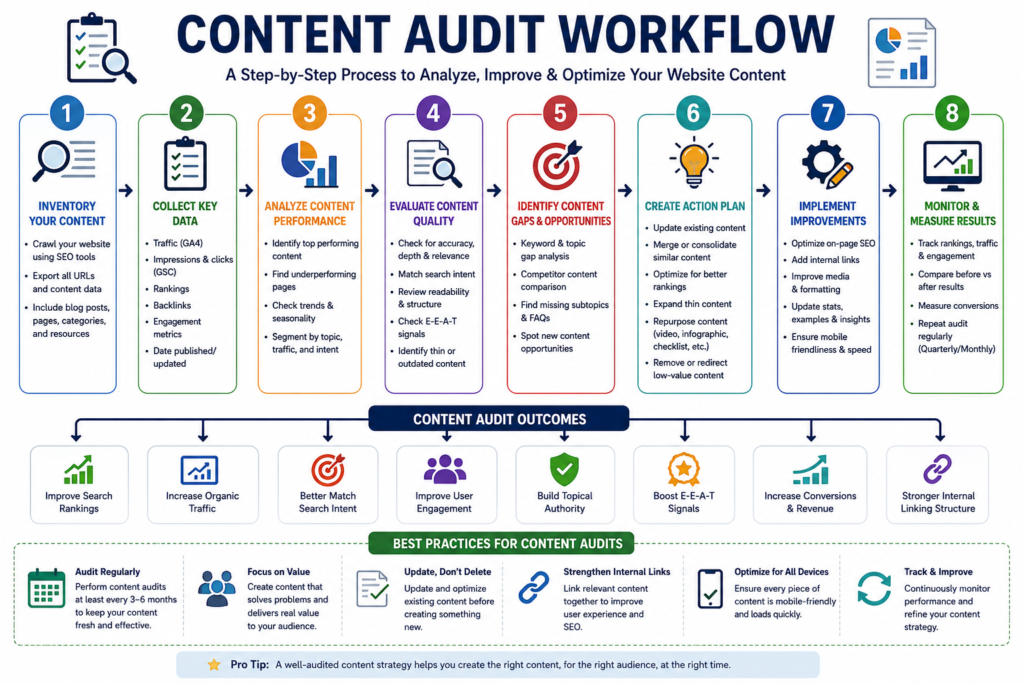
Why a Content Audit Matters
A content audit helps you:
- Improve organic traffic
- Increase keyword rankings
- Remove outdated information
- Identify content gaps
- Improve user engagement
- Reduce duplicate content
- Strengthen topical authority
If your website has hundreds of blog posts, a content audit can quickly reveal which pages are underperforming and why.
1. Identify Thin Content
Thin content refers to pages that provide little or no value to users.
Examples include:
- 150-word blog posts with no useful information
- Empty category pages
- Product pages with one-line descriptions
- Duplicate service pages
How to Identify Thin Content
Use tools like:
- Google Search Console
- Screaming Frog
- Semrush
- Ahrefs
Look for pages with:
- Low word count
- Low traffic
- High bounce rate
- Few impressions
- No backlinks
How to Fix It
Instead of deleting thin pages immediately:
- Add more valuable information
- Include examples
- Add FAQs
- Include images
- Add internal links
- Update outdated statistics
2. Find Outdated Content
Google prefers fresh, accurate, and relevant information.
Examples of outdated content:
❌ Best SEO Tools 2022
❌ Google Algorithm Update 2023
❌ Statistics from 2019
Update:
- Screenshots
- Statistics
- Examples
- Internal links
- Recommendations
Updating existing content is often easier and more effective than creating a new article from scratch.
3. Evaluate Helpful Content
Ask yourself:
Does this article genuinely help the reader?
Google rewards content that:
- Answers questions completely
- Solves real problems
- Includes first-hand experience
- Provides actionable advice
- Demonstrates expertise
- Is easy to understand
Helpful Content Checklist
✔ Original insights
✔ Practical examples
✔ Step-by-step instructions
✔ Expert tips
✔ Updated information
✔ Clear formatting
4. Match Search Intent
Every page should satisfy the user’s intent.
There are four common types of search intent:
| Search Intent | Example |
|---|---|
| Informational | What is SEO? |
| Navigational | Google Search Console |
| Commercial | Best SEO Tools |
| Transactional | Buy SEO Services |
Example
Keyword:
SEO Audit Checklist
Bad Content:
A 300-word article with generic information.
Good Content:
A detailed checklist, examples, downloadable PDF, FAQs, images, and expert advice.
5. Find Keyword Cannibalization
Keyword cannibalization occurs when multiple pages target the same keyword.
Example:
- SEO Checklist
- Complete SEO Checklist
- SEO Checklist Guide
Instead of helping each other, these pages compete against one another.
Solution
- Merge similar articles
- Use canonical tags where appropriate
- Differentiate search intent
- Redirect weaker pages to the stronger version if necessary
6. Identify Content Gaps
Content gaps represent topics your competitors cover but your website does not.
Example
You write about:
- SEO
- Keyword Research
- Link Building
But competitors also cover:
- Entity SEO
- AI SEO
- Voice Search SEO
- Image SEO
- Programmatic SEO
These missing topics are opportunities to expand your topical authority.
Use tools like:
- Ahrefs Content Gap
- Semrush Keyword Gap
- Google Search Console Queries
7. Review Internal Linking
Strong internal linking helps:
- Spread page authority
- Improve crawlability
- Increase time on site
- Help users discover related content
Example:
From this article, you could naturally link to:
- What is SEO?
- Keyword Research Guide
- Technical SEO Guide
- On-Page SEO Guide
- Link Building Guide
- Digital Marketing Guide
Content Audit Checklist
✔ Remove thin content
✔ Update outdated pages
✔ Improve helpfulness
✔ Match search intent
✔ Fix keyword cannibalization
✔ Add missing topics
✔ Strengthen internal linking
Step 6: Audit User Experience (UX)
Google wants to rank websites that people enjoy using. Even excellent content may struggle to rank if the user experience is poor.
User experience (UX) directly affects engagement, conversions, and search performance.
Why UX Matters for SEO
A positive user experience can:
- Increase time on page
- Reduce bounce rates
- Improve conversions
- Encourage return visits
- Support higher rankings
1. Website Navigation
Visitors should be able to find information quickly.
Ask yourself:
- Is the navigation menu simple?
- Are categories organized logically?
- Can users reach important pages in a few clicks?
- Are breadcrumbs available?
Good navigation helps both users and search engines.
2. Analyze User Engagement
Use Google Analytics 4 to review:
- Average engagement time
- Engaged sessions
- Landing pages
- Exit pages
- Conversion paths
If users leave quickly, investigate whether the page:
- Loads slowly
- Doesn’t satisfy search intent
- Is difficult to read
- Has poor formatting
3. Improve Page Layout
Good layout improves readability.
Best practices:
- Short paragraphs
- Bullet points
- Headings
- White space
- Images
- Tables
- Callout boxes
Avoid large walls of text.
4. Improve Readability
Write for humans first.
Tips:
- Use simple English
- Keep sentences concise
- Explain technical terms
- Use active voice
- Break long paragraphs into smaller sections
5. Accessibility
An accessible website serves all users, including those using assistive technologies.
Checklist:
- Descriptive alt text
- Sufficient color contrast
- Keyboard navigation
- Descriptive link text
- Proper heading structure
- Accessible forms
Accessibility improvements often enhance SEO as well.
6. Mobile Experience
Test your website on:
- Android
- iPhone
- Tablets
Check:
- Buttons
- Menus
- Images
- Pop-ups
- Forms
- Loading speed
Google uses mobile-first indexing, making mobile usability essential.
UX Audit Checklist
✔ Easy navigation
✔ Fast loading
✔ Mobile-friendly
✔ Accessible
✔ Readable content
✔ Clear CTAs
✔ Logical page layout
Step 7: Audit Your Backlink Profile
Backlinks remain one of the strongest ranking signals. However, quality is far more important than quantity.
A backlink audit helps you identify both valuable links and potentially harmful ones.
What Are Backlinks?
A backlink is a link from another website pointing to yours.
Example:
A reputable marketing blog links to your SEO guide.
Google interprets this as a vote of confidence.
Why Backlinks Matter
High-quality backlinks can:
- Increase authority
- Improve rankings
- Drive referral traffic
- Build trust
- Help search engines discover your content
1. Analyze Referring Domains
Instead of focusing only on the number of backlinks, examine:
- Number of referring domains
- Authority of linking websites
- Industry relevance
- Geographic relevance
- Diversity of sources
Ten links from reputable websites are generally more valuable than hundreds from low-quality sources.
2. Check Anchor Text
Anchor text is the clickable text in a hyperlink.
Good Examples
- SEO Audit Guide
- Learn Technical SEO
- Beginner SEO Checklist
Avoid excessive use of exact-match keywords, as an unnatural anchor text profile may raise spam signals.
3. Identify Toxic Backlinks
Toxic backlinks may come from:
- Spam websites
- Link farms
- Hacked websites
- Low-quality directories
- Irrelevant foreign websites
Use tools like Ahrefs or Semrush to review your backlink profile. If necessary, consider Google’s Disavow Tool—but only after careful evaluation.
4. Look for Lost Backlinks
Sometimes valuable backlinks disappear because:
- The referring page was removed
- URLs changed
- Redirects were added incorrectly
Recovering high-quality lost backlinks can improve your authority.
5. Find New Link Opportunities
Look for opportunities such as:
- Guest blogging
- Industry directories
- Resource pages
- Digital PR
- Broken link building
- Original research
- Statistics pages
Publishing high-quality content naturally increases your chances of earning backlinks.
Backlink Audit Checklist
✔ Review referring domains
✔ Analyze anchor text
✔ Identify toxic links
✔ Recover lost backlinks
✔ Discover new opportunities
Step 8: Audit Local SEO (If Applicable)
If your business serves customers in a specific geographic area, local SEO is essential.
Examples:
- Digital Marketing Agency
- Dentist
- Restaurant
- Salon
- Law Firm
- Gym
1. Optimize Your Google Business Profile
Ensure your profile includes:
- Business name
- Address
- Phone number
- Website
- Business hours
- Services
- Categories
- High-quality photos
Keep this information accurate and up to date.
2. Check NAP Consistency
NAP stands for:
- Name
- Address
- Phone Number
Your NAP details should be identical across:
- Website
- Google Business Profile
- Social media
- Business directories
- Local citations
Consistency helps search engines trust your business information.
3. Monitor Customer Reviews
Positive reviews improve credibility and can influence local visibility.
Best practices:
- Encourage genuine customer reviews
- Respond professionally to both positive and negative feedback
- Never purchase fake reviews
4. Review Local Citations
Citations are mentions of your business information on other websites.
Examples include:
- Local business directories
- Industry directories
- Chamber of Commerce listings
Correct inaccurate or outdated listings to maintain consistency.
5. Optimize Local Keywords
Instead of targeting:
Digital Marketing
Target:
Digital Marketing Consultant in Mumbai
SEO Expert in Andheri
SEO Services in Mumbai
These location-specific keywords help attract nearby customers.
Local SEO Audit Checklist
✔ Google Business Profile optimized
✔ NAP consistent
✔ Reviews managed
✔ Local citations accurate
✔ Local keywords targeted
Step 9: Analyze Your Competitors
SEO isn’t just about improving your own website—it’s also about understanding what successful competitors are doing.
Competitor analysis helps uncover opportunities you might otherwise miss.
1. Identify Your SEO Competitors
Your search competitors aren’t always your business competitors.
Search your target keywords and note the websites that consistently rank on the first page.
2. Analyze Competitor Keywords
Use Ahrefs or Semrush to discover:
- High-ranking keywords
- Featured snippets
- Long-tail keywords
- Pages generating the most traffic
Compare these findings with your own keyword strategy.
3. Perform a Content Gap Analysis
Identify topics your competitors cover that you haven’t addressed.
Example:
Competitor covers:
- SEO Audit
- Technical SEO
- AI SEO
- Voice Search SEO
- Image SEO
You only cover:
- SEO Audit
- Technical SEO
This reveals clear opportunities for future content.
4. Compare Backlinks
Review:
- Referring domains
- High-authority links
- Industry publications
- Guest posts
Look for reputable websites that link to competitors but not to you, and consider whether similar outreach makes sense.
5. Study Website Structure
Analyze:
- Navigation
- Internal linking
- URL structure
- Content organization
- Category pages
A well-organized site structure improves both usability and crawlability.
6. Identify Opportunities
After completing your competitor analysis, create an action list.
Example:
| Competitor Strength | Your Opportunity |
|---|---|
| More backlinks | Launch a digital PR campaign |
| Better content | Publish more comprehensive guides |
| Faster website | Improve Core Web Vitals |
| Strong local SEO | Optimize Google Business Profile |
| More topical coverage | Create supporting content clusters |
Competitor Analysis Checklist
✔ Identify SEO competitors
✔ Compare keywords
✔ Perform content gap analysis
✔ Analyze backlinks
✔ Review site structure
✔ Document improvement opportunities
Step 10: Create an SEO Audit Report
An SEO audit is only valuable if you take action on the findings. That’s why creating a clear and organized SEO audit report is crucial.
Think of your audit report as a roadmap that outlines:
- What issues exist
- How severe they are
- Which issues to fix first
- Who is responsible
- How success will be measured
Whether you’re managing your own website or working with clients, a well-structured report keeps everyone aligned and focused.
Why an SEO Audit Report Is Important
A professional report helps you:
- Prioritize high-impact SEO tasks
- Track completed improvements
- Monitor website health over time
- Share progress with clients or team members
- Measure the return on your SEO efforts
Without documentation, it’s easy to lose track of what has been fixed and what still needs attention.
What Should an SEO Audit Report Include?
A complete SEO audit report should cover the following sections:
| Section | Purpose |
|---|---|
| Executive Summary | Overview of the website’s SEO health |
| Website Information | Domain, audit date, tools used |
| Technical SEO Issues | Crawlability, indexing, Core Web Vitals |
| On-Page SEO Issues | Titles, meta descriptions, headings, URLs |
| Content Audit | Thin content, outdated pages, search intent |
| Backlink Analysis | Toxic links, referring domains, opportunities |
| User Experience | Navigation, readability, mobile usability |
| Local SEO | Google Business Profile, NAP consistency (if applicable) |
| Competitor Analysis | Keyword gaps, backlinks, opportunities |
| Action Plan | Prioritized fixes with timelines |
Step 1: Start with an Executive Summary
The executive summary provides a quick snapshot of the website’s current SEO performance.
Example:
Website SEO Health Score: 78/100
Major Findings:
- 14 pages are not indexed.
- 23 broken internal links found.
- Largest Contentful Paint exceeds recommended limits.
- Several duplicate title tags detected.
- Mobile usability needs improvement.
- Strong backlink profile but limited referring domains.
This section should be concise and easy for non-technical stakeholders to understand.
Step 2: Categorize Issues by Priority
Not every issue requires immediate attention. Categorizing problems helps you focus on fixes that will have the greatest impact.
High Priority (Fix Immediately)
These issues can significantly affect your rankings and visibility.
Examples:
- Important pages not indexed
- Broken XML sitemap
- Robots.txt blocking key pages
- Server errors (5xx)
- HTTPS issues
- Duplicate canonical tags
- Core Web Vitals failures
Medium Priority
These improvements can enhance user experience and search performance.
Examples:
- Missing meta descriptions
- Duplicate H1 tags
- Large image files
- Weak internal linking
- Missing alt text
- Slow-loading pages
Low Priority
These are optimization opportunities that can be addressed after critical issues.
Examples:
- Minor schema enhancements
- URL refinements
- Additional FAQ sections
- Extra internal links
- Content formatting improvements
Step 3: Assign Responsibility
If you’re working with a team, assign each task to the appropriate person.
Example:
| Issue | Responsible |
|---|---|
| Fix sitemap | SEO Specialist |
| Improve page speed | Developer |
| Update content | Content Writer |
| Compress images | Designer |
| Improve UX | UI/UX Designer |
Clear ownership ensures accountability and prevents tasks from being overlooked.
Step 4: Set Deadlines
Create realistic timelines for resolving issues.
Example:
| Task | Deadline |
|---|---|
| Fix crawl errors | 2 Days |
| Optimize Core Web Vitals | 1 Week |
| Update thin content | 2 Weeks |
| Improve internal linking | 1 Week |
| Publish missing content | 3 Weeks |
Step 5: Monitor Results
SEO is an ongoing process. After implementing fixes, monitor key performance indicators (KPIs) to measure progress.
Track metrics such as:
- Organic traffic
- Keyword rankings
- Indexed pages
- Click-through rate (CTR)
- Bounce rate
- Conversion rate
- Core Web Vitals
- Backlink growth
Review your progress monthly and update your report accordingly.
Example SEO Audit Report Format
| Audit Category | Issue | Priority | Status | Assigned To |
|---|---|---|---|---|
| Indexing | 12 pages not indexed | High | Pending | SEO Team |
| Technical SEO | Slow page speed | High | In Progress | Developer |
| On-Page SEO | Missing meta descriptions | Medium | Pending | Content Team |
| Content | 8 outdated articles | Medium | Pending | Writer |
| Backlinks | Toxic backlinks detected | Medium | Completed | SEO Team |
| UX | Mobile navigation issue | High | Pending | Designer |
Pro Tip
Don’t try to fix every issue at once. Address technical problems first, followed by content improvements, user experience enhancements, and backlink optimization.
Common SEO Audit Mistakes Beginners Make
Even with the best intentions, beginners often make mistakes that can negatively impact their website’s SEO. Understanding these common pitfalls will help you avoid costly errors.
1. Ignoring Google Search Console
Many beginners rely solely on third-party tools and overlook Google Search Console, which provides direct insights from Google about indexing, crawl errors, and search performance.
Solution: Check Google Search Console regularly and monitor important reports.
2. Focusing Only on Keywords
SEO is more than keyword placement. Technical SEO, user experience, and content quality also influence rankings.
Solution: Take a holistic approach to optimization.
3. Publishing Thin Content
Short, low-value articles rarely perform well in search results.
Solution: Create comprehensive, helpful content that answers user questions in depth.
4. Ignoring Search Intent
Targeting a keyword without understanding what users expect can lead to poor engagement.
Solution: Analyze the search results and create content that matches the dominant search intent.
5. Forgetting Mobile Optimization
A website that performs well on desktop but poorly on mobile can lose valuable traffic.
Solution: Test your website on multiple devices and prioritize mobile usability.
6. Overlooking Core Web Vitals
Slow-loading pages and poor responsiveness can hurt both user experience and search visibility.
Solution: Regularly monitor Core Web Vitals using Google PageSpeed Insights and Google Search Console.
7. Missing or Duplicate Meta Tags
Duplicate or missing title tags and meta descriptions make it harder for search engines to understand your pages.
Solution: Write unique, descriptive titles and meta descriptions for every important page.
8. Broken Internal Links
Broken links frustrate users and waste crawl budget.
Solution: Use tools like Screaming Frog to identify and fix broken links.
9. Neglecting Image SEO
Large image files and missing alt text can slow your site and reduce accessibility.
Solution: Compress images, use descriptive filenames, and add meaningful alt text.
10. Ignoring Duplicate Content
Duplicate pages can confuse search engines and dilute ranking signals.
Solution: Use canonical tags and consolidate similar pages when appropriate.
11. Poor Internal Linking
Without strong internal links, important pages may receive less authority and become harder for users to discover.
Solution: Link related content naturally using descriptive anchor text.
12. Not Updating Old Content
Publishing new content while ignoring older articles can cause your website to become outdated.
Solution: Refresh existing content with updated information, examples, and statistics.
13. Chasing Every Algorithm Update
Making drastic changes after every Google update can create instability.
Solution: Focus on long-term SEO best practices and user value rather than reacting to every algorithm change.
14. Buying Low-Quality Backlinks
Purchasing spammy backlinks may provide short-term gains but can result in penalties or lost trust.
Solution: Earn backlinks naturally through valuable content, outreach, and digital PR.
15. Skipping Regular SEO Audits
Many website owners perform one audit and never revisit their SEO.
Solution: Conduct regular audits—quarterly for most websites or monthly for larger, frequently updated sites.
16. Not Tracking Results
Implementing changes without measuring their impact makes it difficult to understand what works.
Solution: Monitor traffic, rankings, conversions, and Core Web Vitals using Google Analytics 4 and Google Search Console.
Summary Box: Top SEO Audit Mistakes
Avoid these common pitfalls:
- Ignoring Google Search Console
- Publishing thin or outdated content
- Overlooking mobile optimization
- Ignoring Core Web Vitals
- Failing to fix crawl errors
- Neglecting internal linking
- Using duplicate meta tags
- Buying low-quality backlinks
- Skipping regular SEO audits
- Not tracking performance
Best Free SEO Audit Tools
Choosing the right tools can make your SEO audit faster, more accurate, and more actionable. Below is a comparison of some of the most popular options.
| Tool | Best For | Free Version | Paid Version | Pros | Cons |
|---|---|---|---|---|---|
| Google Search Console | Indexing, crawl errors, search performance | ✅ Yes | ❌ No | Direct data from Google, free to use | Limited competitor insights |
| Google Analytics 4 | Traffic and user behavior | ✅ Yes | ❌ No | Powerful analytics, conversion tracking | Learning curve for beginners |
| Google PageSpeed Insights | Page speed & Core Web Vitals | ✅ Yes | ❌ No | Free, actionable recommendations | Tests one URL at a time |
| Google Lighthouse | Performance, SEO & accessibility | ✅ Yes | ❌ No | Built into Chrome, comprehensive audits | Limited historical tracking |
| Bing Webmaster Tools | Bing SEO insights | ✅ Yes | ❌ No | Free site scans and SEO reports | Smaller search market share |
| GTmetrix | Website speed analysis | ✅ Yes | ✅ Yes | Detailed performance reports | Some advanced features require a paid plan |
| Screaming Frog SEO Spider | Technical SEO crawling | ✅ Up to 500 URLs | ✅ Yes | Excellent for technical audits | URL limit in free version |
| Ahrefs Webmaster Tools | Backlink analysis & site audits | ✅ Limited | ✅ Yes | High-quality backlink data | Many advanced features are paid |
| Semrush | All-in-one SEO platform | ✅ Limited | ✅ Yes | Site audits, keyword research, competitor analysis | Premium plans can be expensive |
| Moz Pro | SEO tracking and optimization | ❌ Trial Only | ✅ Yes | User-friendly interface | Smaller keyword database compared to some competitors |
Expert Recommendations
Best Free Tool for Beginners
🏆 Google Search Console
Why?
- Free
- Official Google data
- Essential for indexing, crawl errors, and performance monitoring
Best Technical SEO Tool
🏆 Screaming Frog SEO Spider
Ideal for:
- Finding broken links
- Detecting duplicate content
- Auditing metadata
- Identifying crawl issues
Best All-in-One SEO Platform
🏆 Semrush
Best suited for:
- Keyword research
- Competitor analysis
- Site audits
- Position tracking
- Content optimization
Best Backlink Analysis Tool
🏆 Ahrefs
Excellent for:
- Backlink audits
- Referring domain analysis
- Link-building opportunities
- Competitor backlink research
Printable SEO Audit Checklist
Pro Tip: Print this checklist or convert it into a Google Sheet, Notion template, or project management board (such as Trello or Asana) to track your SEO improvements over time.
1. Website Indexing
☐ Check indexed pages using site:yourdomain.com
☐ Verify indexing status in Google Search Console
☐ Identify non-indexed important pages
☐ Remove unnecessary noindex tags
☐ Inspect important URLs
☐ Submit XML Sitemap
☐ Check canonical URLs
☐ Remove duplicate indexed pages
2. Crawlability
☐ Fix 404 errors
☐ Fix Soft 404 pages
☐ Remove redirect chains
☐ Fix redirect loops
☐ Repair broken internal links
☐ Resolve server (5xx) errors
☐ Update outdated URLs
☐ Verify crawl budget isn’t being wasted
3. Technical SEO
☐ HTTPS enabled
☐ SSL certificate working
☐ XML Sitemap updated
☐ Robots.txt configured correctly
☐ Canonical tags implemented
☐ Structured data validated
☐ Schema markup added
☐ Core Web Vitals optimized
☐ Mobile-friendly website
☐ Fast page loading speed
☐ No mixed-content issues
4. On-Page SEO
☐ Optimize page titles
☐ Write unique meta descriptions
☐ Maintain one H1 per page
☐ Use proper H2 and H3 hierarchy
☐ Optimize URLs
☐ Improve image SEO
☐ Add descriptive alt text
☐ Optimize keyword placement
☐ Improve internal linking
☐ Remove duplicate content
☐ Add external authority links where appropriate
5. Content Audit
☐ Remove or improve thin content
☐ Update outdated articles
☐ Match search intent
☐ Add FAQs
☐ Improve readability
☐ Add practical examples
☐ Include expert insights
☐ Identify content gaps
☐ Fix keyword cannibalization
☐ Refresh statistics and screenshots
6. User Experience (UX)
☐ Improve website navigation
☐ Simplify menus
☐ Increase readability
☐ Improve accessibility
☐ Optimize for mobile devices
☐ Reduce bounce rate
☐ Improve page layout
☐ Add clear calls-to-action (CTAs)
7. Backlink Audit
☐ Analyze referring domains
☐ Review anchor text distribution
☐ Identify toxic backlinks
☐ Recover lost backlinks
☐ Find new link-building opportunities
☐ Monitor competitor backlinks
8. Local SEO (If Applicable)
☐ Optimize Google Business Profile
☐ Verify NAP consistency
☐ Add local keywords
☐ Build local citations
☐ Collect genuine customer reviews
☐ Respond to reviews
9. Competitor Analysis
☐ Identify SEO competitors
☐ Compare keyword rankings
☐ Analyze competitor content
☐ Perform content gap analysis
☐ Compare backlink profiles
☐ Review site structure
☐ Identify opportunities
10. SEO Reporting
☐ Prioritize issues
☐ Assign responsibilities
☐ Track completed tasks
☐ Monitor keyword rankings
☐ Measure organic traffic
☐ Review Core Web Vitals monthly
☐ Schedule the next SEO audit
Complete Website Health Checklist
| SEO Area | Status |
|---|---|
| Website Indexing | ☐ |
| Crawlability | ☐ |
| Technical SEO | ☐ |
| On-Page SEO | ☐ |
| Content Quality | ☐ |
| User Experience | ☐ |
| Backlinks | ☐ |
| Local SEO | ☐ |
| Competitor Analysis | ☐ |
| SEO Reporting | ☐ |
Expert Tip: Perform a full SEO audit every 3–6 months, or more frequently if you regularly publish new content or manage a large website.
Congratulations! You’ve now learned how to conduct a complete SEO Audit—from checking indexing and fixing technical issues to improving content, user experience, backlinks, and local SEO. The final step is ensuring your article itself is fully optimized for search engines, AI-powered search experiences, and readers.
Internal Linking Suggestions
Internal links help search engines understand your website structure while guiding users to related content. They also distribute link equity throughout your website, improving crawlability and engagement.
Below are natural anchor text suggestions you can use within this article.
| Suggested Anchor Text | Link To |
|---|---|
| What is SEO? | Beginner SEO Guide |
| Keyword Research Guide | Complete Keyword Research Article |
| On-Page SEO Guide | On-Page SEO Blog |
| Technical SEO Guide | Technical SEO Tutorial |
| Link Building Guide | Link Building Strategies |
| Digital Marketing Guide | Complete Digital Marketing Guide |
| Local SEO Guide | Local SEO Tutorial |
| Core Web Vitals Explained | Core Web Vitals Blog |
| Google Search Console Guide | Search Console Tutorial |
| Image SEO Guide | Image Optimization Article |
| SEO Checklist | Printable SEO Checklist |
| Website Speed Optimization | Page Speed Guide |
Internal Linking Best Practices
- Use descriptive anchor text instead of generic phrases like “Click Here.”
- Link only where it provides value to the reader.
- Prioritize linking to your most important pages.
- Update internal links whenever you publish new content.
- Avoid excessive internal links on a single page.
Expert Tip: A well-planned internal linking strategy helps search engines understand your website’s topical authority while improving user navigation.
Recommended External References
Linking to authoritative resources can strengthen your content’s credibility and provide readers with additional learning opportunities.
Consider referencing:
- Google Search Central
- Google Search Console Help Center
- Google Analytics Help Center
- Google PageSpeed Insights
- Google Lighthouse Documentation
- Schema.org
- Web.dev
- Bing Webmaster Tools
- W3C Web Accessibility Initiative
- Mozilla Developer Network (MDN)
Why Use Authoritative References?
High-quality external references help:
- Build trust with readers
- Support factual accuracy
- Improve EEAT (Experience, Expertise, Authoritativeness, Trustworthiness)
- Provide additional context for advanced topics
Best Practice: Link only when the external resource genuinely adds value. Avoid excessive or irrelevant outbound links.
SEO Meta Information
SEO Meta Title (60 Characters)
How to Do an SEO Audit Step by Step: Beginner Guide (2026)
Approx. 59 characters
SEO Meta Description (155 Characters)
Learn how to perform a complete SEO audit step by step in 2026. Improve rankings, fix technical SEO issues, and increase organic traffic.
Approx. 154 characters
SEO-Friendly URL Slug
how-to-do-an-seo-audit-step-by-stepFocus Keyword
SEO
Primary Keywords
- SEO
- Digital Marketing
Secondary Keywords
- SEO Audit
- Website SEO Audit
- Technical SEO Audit
- On-Page SEO Audit
- Off-Page SEO Audit
- SEO Checklist
- SEO Guide for Beginners
- SEO Audit Tools
- Google Search Console
- Google Analytics
- Website Optimization
- SEO Best Practices 2026
- Improve Website Ranking
- SEO Strategy
- Organic Traffic
- Core Web Vitals
- Indexing
- Crawl Errors
Keyword Variations
Use these naturally throughout the article without keyword stuffing:
- Search Engine Optimization
- Website SEO
- SEO Health Check
- SEO Website Analysis
- Website Audit
- Website Performance Optimization
- Technical Website Audit
- SEO Performance
- Organic Search Optimization
- Search Rankings
- Website Visibility
- Google Ranking Factors
- Improve Search Rankings
- SEO Optimization Guide
- SEO for Beginners
- Website Health Score
- Website Crawlability
- Website Indexing
- Content Optimization
- Website Authority
AI Search Optimization Tips
Modern search engines increasingly rely on AI to interpret and summarize content. To improve your visibility in AI-powered search experiences such as Google AI Overviews, ChatGPT Search, Perplexity AI, and Bing Copilot:
1. Answer Questions Clearly
Provide concise answers before diving into detailed explanations.
2. Use Structured Headings
Maintain a logical H2 → H3 hierarchy to help both users and AI understand your content.
3. Include Tables and Checklists
Well-organized tables and printable checklists are easier for AI systems to interpret and summarize.
4. Demonstrate Experience
Include practical examples, real-world scenarios, and actionable recommendations that reflect first-hand knowledge.
5. Keep Content Current
Review and update your content regularly to ensure it reflects the latest SEO best practices and algorithm changes.
Final Thoughts
Search engine optimization isn’t a one-time task—it’s an ongoing process of improving your website to meet the evolving expectations of users and search engines.
A comprehensive SEO audit gives you a clear understanding of your website’s strengths, weaknesses, and opportunities for growth. By following the ten-step process outlined in this guide, you can identify technical issues, optimize your content, improve user experience, strengthen your backlink profile, and build a solid foundation for sustainable organic growth.
Remember, meaningful SEO improvements don’t happen overnight. Focus on fixing high-impact issues first, monitor your performance consistently, and continue refining your website based on data and user feedback. Small, consistent improvements often lead to significant long-term results.
Whether you’re a beginner learning the basics or a digital marketer managing multiple websites, making SEO audits a regular part of your workflow will help you stay ahead of competitors and adapt to the ever-changing search landscape.
Also read : The complete guide to AI in Digital Marketing.